Solutions · Executive AssistantLive
Give Sophie work like you’d give it to a person.
An employee who stays ahead of your inbox, gets you ready for what’s next, and keeps things moving when you can’t — at your desk or on your phone, always within the limits you set.
Let's reconnect sometime next week
Good seeing you at the summit. Thirty minutes should do it.
Give her work the way you already do
Forward it. CC her. Tell her. Ask her.
Four ways in. One employee who owns the work until it’s done.
Forward it
Forward any email to Sophie.
- “Handle this.”
- “Follow up until he responds.”
CC her
Add Sophie to a thread and step out of it.
- “Kevin, Sophie can find us some time next week.”
Tell her
From the mobile app, by text or by voice.
- “Move my meeting with Kevin to next week.”
- “Call Sarah and tell her I’ll be late.”
Ask her to find it
No filename needed.
- “Find the latest Corvane SOW.”
- “Pull up the deck Kevin emailed me last month.”
Live
Watch your day get handled.
Mail, meetings and follow-ups, with the hours she hands back.
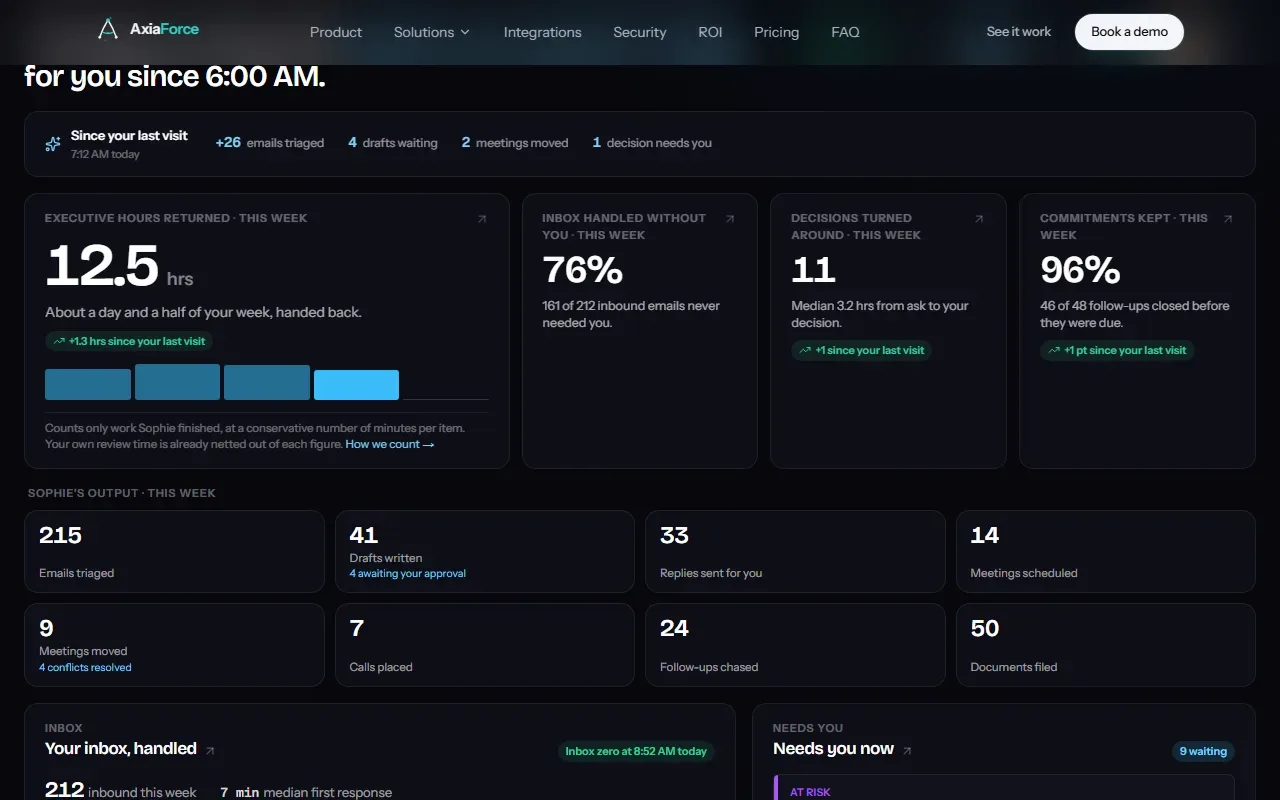
Live product screen · illustrative workspace data
Everyday use
One request. One useful result.
Before a meeting
PilotYou say
“Prep me for my 2 PM with Kevin.”
Sophie
A brief from the thread history, the CRM and your documents — ready an hour before.
Between meetings
PilotAn email arrives
“Sarah needs the signed agreement by 3 PM.”
Sophie
Flagged as critical, with a reply drafted for you to review.
Away from your desk
PilotYou ask
“What needs me today?”
Sophie
The decisions waiting on you and the status of the work you delegated, in one place.
Illustrative examples · each badge shows where the capability is today.
The loop Sophie owns
Operating
- Receive
- 31 emails todayUnderstand
- 19 work objectsAct← Find document · 137 documents found← Ask first · 37 approvals
- 14 actions takenFollow up
- 6 follow-upsReport
- Hours returned212
I didn’t ask AI a question. I gave work to my employee.
- Stays ahead of your inbox
- Gets you ready for what’s next
- Keeps moving while you’re away — and tells you when it needs you
See Sophie work
Six moments, start to finish.
Forward it. Forget it.
Synthetic data · original AxiaForce demo interfaces · tap a step to jump
Open in the full demoVisibility and control
Delegate with visibility and control.
You decide how much she does alone — and you can see all of it.
You choose the access
Sophie reaches only the accounts you connect, and your tenant and user permissions govern the rest.
You set the autonomy
Choose what she does on her own and what waits for your approval — per action, changeable any time.
Approvals show the plan
When she asks first, you see what she proposes to do and why.
Every action is on record
A timestamped history of what she did and the result, exportable for your auditors.
In your pocket
Hey Sophie.
Everything on this page, from your phone — by voice, by share sheet, or because Sophie brought it to you.
Getting started · Pilot
Get Sophie started.
A few guided steps, and Sophie never sends or changes anything without your approval.
- Step 1
Subscribe. Sign up and add your card.
- Step 2
We set up your workspace.
- Step 3
Sign in and meet your assistant.
- Step 4
Connect your tools. Microsoft 365 today; Google Workspace is coming later.
- Step 5
Choose how much she can do, then give her her first job.
Timeframes are illustrative. Actual setup depends on your systems and scope.
Get the mobile app (App Store or Google Play) once you have set up online.
Ready to start? See plans & pricing.
Your own secure environment
AxiaForce provisions a dedicated data environment for your company — never a shared customer database.
What that means for your data
- Sophie can search only the files and emails your connected account is permitted to access
- AxiaForce never creates broader access than Microsoft or Google already permits
- Every read, write, decision and approval is a timestamped, exportable evidence event
- Your data is never used to train a shared model
Who it’s for
Executive support, without executive overhead.
Enterprise executives
The executive office, without the coordination.
What she takes on
Enterprise executives
The executive office, without the coordination.
- Find important information immediately
- Surface critical email; protect commitments
- Coordinate meetings across calendars and time zones
- Prepare for meetings; follow up after them
Founders & entrepreneurs
An executive office before you build one.
What she takes on
Founders & entrepreneurs
An executive office before you build one.
- Delay administrative headcount
- Recover executive time every day
- Coordinate customers, investors and vendors
- Support multiple companies or brands
What’s real today
Live, in pilot, and coming.
The demo shows the full vision. The badges say where each capability actually is.
Running for customers today.
- Forward to assistant
- CC assistant on threads
- Email scheduling
- Reschedule & cancel
- Attendee changes
- Multi-person scheduling
- Time-zone aware
- Teams · Zoom · Meet links
- Work objects & evidence
- Live Fabric
- Approvals in Mission Control
- Assistant scorecard
Running with early-access customers; shaping the production version.
- Travel-aware scheduling
- Find My Document
- Outlook search
- OneDrive search
- Email attachment retrieval
- Likely-latest version detection
- In-product preview
- Send & attach retrieved files
- Microsoft 365
- Inbox triage
- Critical email detection
- Commitment tracking
- Follow-up ownership
- Daily brief
- Meeting brief
- Mobile app
- Hey Sophie (voice)
- CRM updates
- Lead handoff to GTM employee
- Recruiting coordination
- Delegate to other AI employees
Designed and shown here as the target experience; not yet in production.
- SharePoint search
- Google Drive search
- Google Workspace
- Post-meeting follow-up
- Read transcripts · book the meetings asked for
- Push notifications
- SMS
- Phone calls
- Voicemail
- Push → SMS → call escalation
- Restaurant reservations
- Travel coordination
- Venue coordination
- Self-service onboarding
Two agents, one workflow
Hiring moves forward while your day stays clear.
Talia screens and shortlists. Sophie turns the interviews into a calendar that works and keeps your inbox under control.

- Screens resumes against the role
- Builds the shortlist
- Proposes interview times

- Triages your inbox
- Clears and protects your calendar
- Prepares your briefing
- 1Talia shortlists and proposes times
- 2Sophie checks them against your real calendar
- 3The interview lands on your calendar with a briefing
Hire your AI Executive Assistant.
Forward one email. Watch it come back done.